
First Vocal
This procedure creates a sung vocal from a short, monophonic phrase.
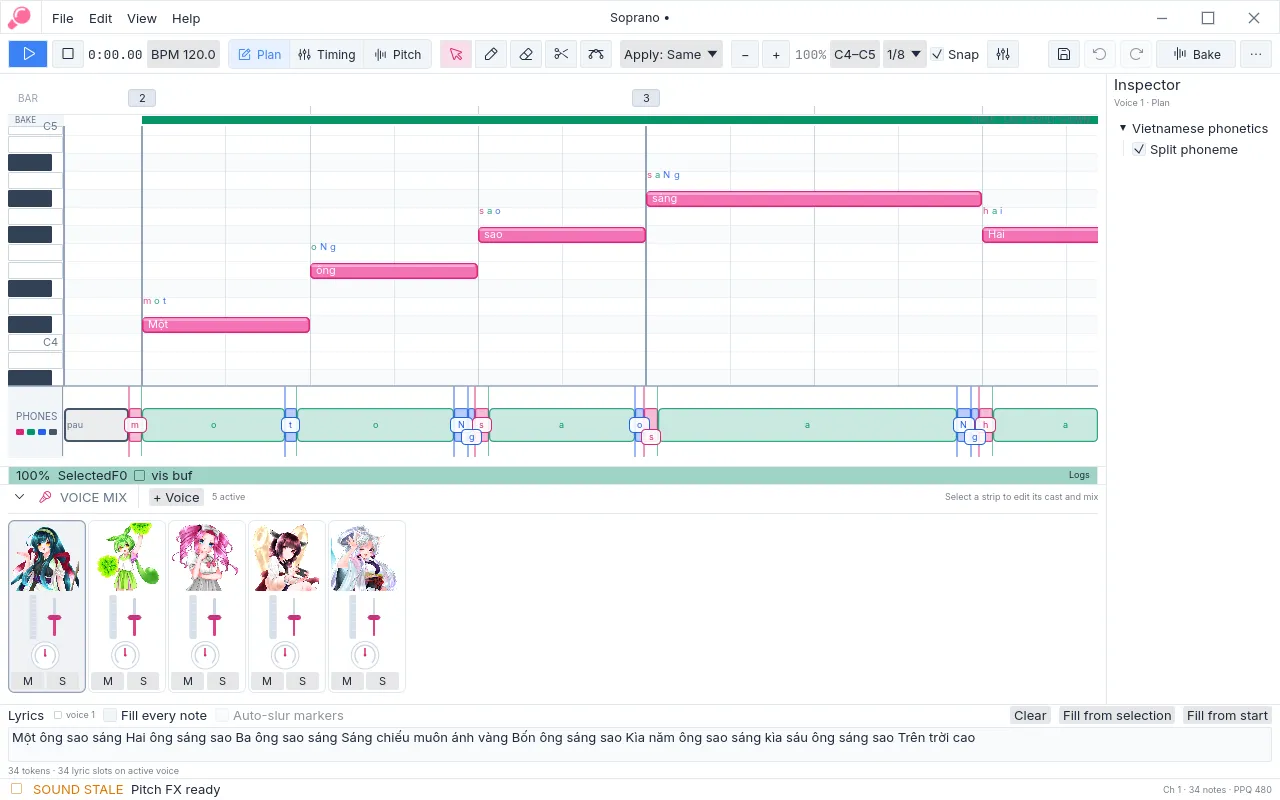
Figure 1. A vocal part begins as notes, lyrics, and a phoneme plan.
- Create a project and select a voice in the voice rail.
- In Plan mode, draw the notes at their required written pitch and duration.
- Select the notes, enter the lyric in the batch lyrics panel, and choose Fill from start.
- Add slurs where one syllable must continue across successive notes.
- Inspect the phoneme plan. If a planned pronunciation is unsuitable, enter a manual override for that material.
- Bake once and listen. If a consonant or vowel onset is misplaced, use Timing to nudge the relevant boundary.
- If the sung contour requires expression, use Pitch to adjust the note or the relevant processor layer.
- Choose Bake or press Ctrl+Enter.
- Audition with Space. After any material revision, bake again before judging or exporting the result.
- Export with File → Import / Export → Export voice stems (mono)….
The exported WAV is a 48 kHz mono stem for the selected voice. For projects with several voices, repeat the procedure for each part before export.
See Import and export for score interchange and planning-data exports.