
Timing Nudge
Use a Timing Nudge when a phone boundary sounds misplaced relative to the musical beat or the intended diction.
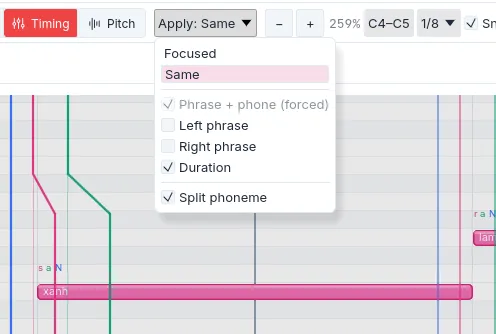
Figure 1. Timing edits can target the focused boundary or matching material.
Nudge one boundary
Section titled “Nudge one boundary”- Bake and listen to the phrase.
- Enter Timing mode and focus the boundary associated with the audible issue.
- Drag the boundary toward the required position.
- Bake and listen again.
The edit stores an offset from the predicted boundary. Moving a boundary also changes the duration of the phone regions on either side; it does not move the written note.
Apply matching timing
Section titled “Apply matching timing”Apply: Same matches the same lyric, phone, phone position, and phone role in the current voice. Duration, Left phrase, and Right phrase add those conditions. Matching boundaries receive the correction. Listen to every affected phrase because its musical context may differ.
If the correction is no longer appropriate, focus the edited node and choose Reset focused timing node. The boundary returns to its predicted position on the next bake.