
Setup
Amadeus requires an inference runtime and at least one compatible voice model before it can bake audio. The first launch opens the setup wizard.
Complete setup
Section titled “Complete setup”- Select an inference runtime reported as available.
- Install or select at least one voice model.
- Finish the wizard and create or open a project.
The available runtime choices depend on the computer and installed software. CPU execution is the most broadly compatible option. GPU and accelerator options require compatible drivers and hardware. If an option is unavailable, select CPU or correct the indicated system requirement before continuing.
Set defaults
Section titled “Set defaults”Open Settings to choose the default voice and language phonemizer. Amadeus uses these selections when creating a new project and when opening the score import dialog. Choose Automatic for the phonemizer to let each voice use the enabled package that supports its language. An import can still override the default for that score.
The interface language can be selected in Settings. The selected language applies to application controls, setup, import, voice management, and progress messages; missing translations fall back to the default language.
Select a voice
Section titled “Select a voice”A voice model supplies one cast for vocal rendering. Select a cast for each voice before baking.
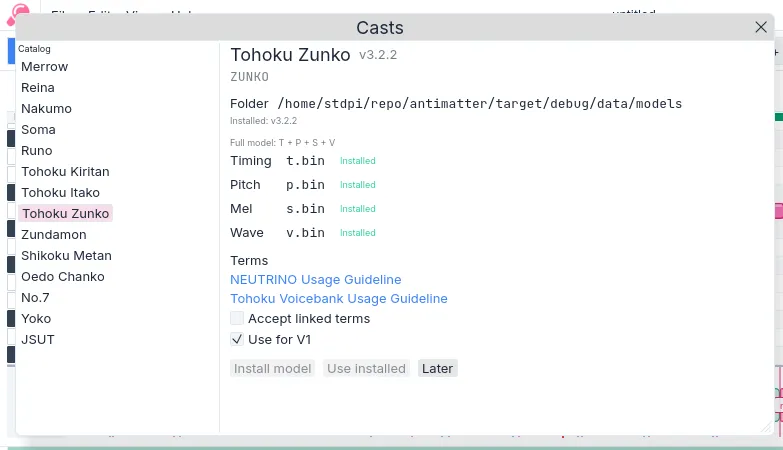
Figure 1. The Casts dialog identifies installed voices and their available components.

Figure 2. The voice rail selects the active part and its cast.
| Condition | Action | Result |
|---|---|---|
| A cast reports missing required components. | Install or repair that voice before selecting it. | The cast becomes available for baking when its required components are present. |
| The project contains several vocal parts. | Assign a cast to each voice in the voice rail. | Each part bakes with its selected singer model. |
| No voice is selected. | Select a voice in the rail. | The piano roll and Inspector change to that part. |
Continue
Section titled “Continue”- Editor indexes Plan, Timing, and Pitch.
- First Vocal gives the normal notation-to-stem procedure.