
Pronunciation
The phone display shows how the selected voice language package currently represents a lyric. Review it after changing lyrics, notes, slurs, or the voice’s language.
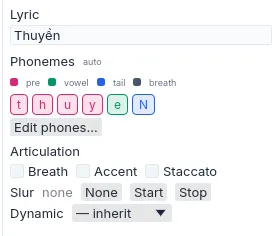
Figure 1. Planned phones remain visible with their note material.
Override a pronunciation
Section titled “Override a pronunciation”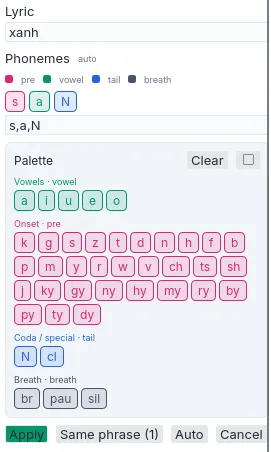
Figure 2. A manual phone sequence replaces automatic planning for the selected material.
- Select the note whose pronunciation is unsuitable.
- Choose Edit phones….
- Enter the phone sequence accepted by the selected voice language package.
- Apply the override and bake the voice.
The override persists with the project and takes priority over automatic planning for that material. If the lyric later changes, return the field to Auto unless the same manual sequence remains appropriate.
| Condition | Action | Result |
|---|---|---|
| The planned phones match the intended diction. | Leave the field on Auto. | Later lyric and slur edits can replan pronunciation normally. |
| One pronunciation is consistently unsuitable. | Apply a manual phone override. | The selected sequence is used on subsequent bakes. |
| The override no longer matches the lyric. | Select Auto. | Automatic pronunciation becomes authoritative again. |