
Keyboard shortcuts
Bindings can be changed in Settings → Keybinds. Menu labels display the current binding where available.
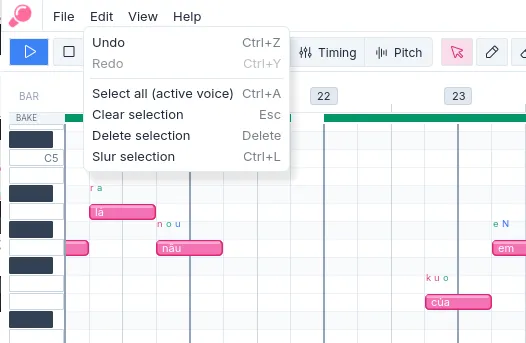
Figure 1. Menus show the binding currently assigned to applicable commands.
| Command | Default binding |
|---|---|
| Play or pause | Space |
| Plan / Timing / Pitch mode | 1 / 2 / 3 |
| Select / Draw / Erase / Split / Slur | V / B / E / X / S |
| Undo / redo | Ctrl+Z / Ctrl+Y |
| Copy / paste selected notes | Ctrl+C / Ctrl+V |
| Move selected notes by semitone / octave | ↑ / Shift+↑ (downward movement uses the corresponding down-arrow bindings) |
| New / open / save | Ctrl+N / Ctrl+O / Ctrl+S |
| Import score | Ctrl+I |
| Bake voice stems | Ctrl+Enter |
| Export voice stems | Ctrl+Shift+E |
| Export Sinsy labels | Ctrl+E |
| Quit | Ctrl+Q |
When a text field has focus, editor shortcuts are generally unavailable so that text entry remains predictable.
Paste is available in Plan mode. After copying notes, choose Paste to enter a placement preview; click to commit it or right-click to cancel. All commands can be reassigned in Settings → Keybinds.