
Import and export
Use File → Import / Export to exchange scores and deliver rendered audio.
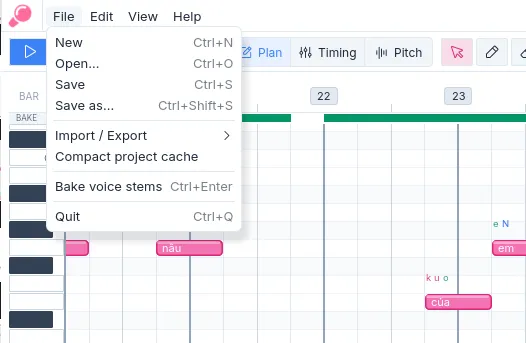
Figure 1. File operations are grouped under Import / Export.
Import a score
Section titled “Import a score”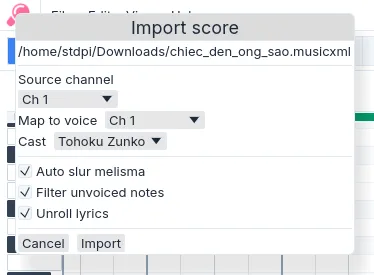
Figure 2. Built-in score import dialog.
Amadeus provides MIDI and MusicXML import. Choose Import… or press Ctrl+I, then review the resulting voices, notation, and lyrics before baking.
Choose a language phonemizer
Section titled “Choose a language phonemizer”The import dialog includes Language phonemizer. Leave it on Automatic to select an enabled package that supports the imported language, or choose a specific installed package. The selected package is assigned to the imported voice and can be changed later from the voice card. The default phonemizer in Settings supplies the initial selection for new imports.
Format support
Section titled “Format support”| Format | State | Primary compatibility | Limits |
|---|---|---|---|
| MIDI | Beta | Standard MIDI files | Preserves note pitch, rhythm, channels, and available lyric events. Notation detail is limited. |
| MusicXML | Beta | MuseScore; Dolet for Sibelius | Other producers are not assured. Unsupported notation may be omitted or reported for review. |
MusicXML import covers parts, voices, pitched notes, lyrics, ties, slurs, tempo, meter, and common vocal articulations. Chords may be separated into voices. Tuplets, grace notes, ornaments, harmony, figured bass, unpitched notes, and application-specific extensions are not fully represented.
MusicXML is generally preferable when the source contains lyric and notation detail. MIDI is useful for note pitch and rhythm but commonly carries less vocal text information.
Enabled importer packages may add further formats to the same dialog.
| Condition | Result |
|---|---|
| Auto slur melisma is enabled. | Imported lyric continuations may become authored slurs. Review the resulting chains in Plan mode. |
| Filter unvoiced notes is enabled. | Notes considered non-vocal by the importer are omitted. Review the score before saving. |
Unroll lyrics (WIP) is enabled. | Recognized syllabic continuations are expanded into note lyric slots. Review and correct every affected passage in Plan. |
Export audio
Section titled “Export audio”Stem export bakes the score using the current render settings. Each exported stem is a separate 48 kHz mono WAV file.
Export active stem renders the active voice and opens a file-save dialog for its output. Export all stems renders every voice with notes and writes one file per voice to a selected folder. If an output file already exists, Amadeus requests confirmation before replacing it. Filenames follow the project stem filename template, configurable from the export menu.
Stem export produces separate voice files; it does not create a final stereo master.
Export labels
Section titled “Export labels”- Export Sinsy labels writes the finalized full-context label.
This export is intended for inspection and compatible external workflows; it does not replace the rendered voice stems.